


Description
Download OLM Converter – Secure OST to PST Conversion Tool for Windows, Mac, Android, iOS
Effortless OLM to PST Conversion with Advanced Features
OLM Converter stands out as a reliable solution for users needing to convert OLM files to PST format, especially when migrating from older Outlook for Mac to Microsoft Outlook on Windows. This powerful software simplifies the complex task of file migration by offering a streamlined, secure, and efficient conversion process. Whether you're a business professional managing large email archives or an individual recovering personal data, OLM Converter ensures your emails, contacts, calendars, and attachments remain intact throughout the transition. The tool supports batch conversion, allowing multiple OLM files to be processed at once, saving valuable time during large-scale migrations.
One of the standout features is its ability to convert OLM files into multiple formats beyond PST, including PDF, EML, CSV, and MBOX. This versatility makes it an ideal tool for users who want to export data for backup, archiving, or compatibility with alternative email clients. For example, exporting to PDF ensures easy sharing and long-term storage, while EML and CSV formats are perfect for importing into other email platforms or data analysis tools. The software also preserves the original folder hierarchy, ensuring that your meticulously organized email structure remains untouched during the conversion.
Additionally, OLM Converter supports direct migration to popular email services such as Gmail, Yahoo Mail, Office 365, Hotmail, IMAP, Thunderbird, and AOL. This means you can not only convert your data but also transfer it directly into your preferred email environment without the need for intermediate steps. With a clean, intuitive interface, even non-technical users can navigate the tool with ease. The software is regularly updated to maintain compatibility with the latest Outlook versions and operating systems, ensuring long-term usability.
Seamless Installation and User-Friendly Experience
Getting started with OLM Converter is straightforward, thanks to its lightweight installer and minimal system requirements. The software is compatible with Windows 7 and later, including Windows 10 and 11, as well as macOS versions from 10.13 onwards. For mobile users, the tool also offers support through companion apps on Android and iOS, allowing access to converted files on the go. The installation process takes less than two minutes and does not require administrative privileges on most systems, making it suitable for both home and enterprise environments.
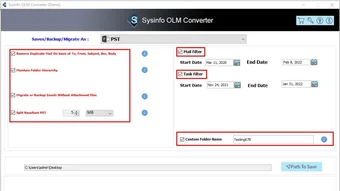
Once installed, the user interface is clean and logically organized. The main dashboard presents a simple three-step workflow: select the OLM file, choose the output format, and initiate the conversion. Users can preview the contents of their OLM files before conversion, which helps verify data integrity and ensures no critical information is missed. The software also includes a progress tracker that displays real-time conversion status, estimated time remaining, and file size information.
For those who prefer automation, OLM Converter supports scheduled conversions and command-line execution, which is particularly useful for IT administrators managing bulk migrations across multiple user accounts. The tool also generates detailed logs after each conversion, which can be used for auditing or troubleshooting purposes. These logs include timestamps, file paths, and error messages if any occur during processing. Overall, the combination of ease of use, powerful functionality, and robust support makes OLM Converter a top choice for anyone needing a dependable OLM to PST conversion tool.
Comprehensive Compatibility and Security Features
OLM Converter is engineered to work across a wide range of platforms, making it one of the most versatile tools in its category. It supports Windows, Mac, Android, and iOS, ensuring that users can access their converted data regardless of their primary device. This cross-platform compatibility is especially beneficial for remote teams or individuals who switch between desktop and mobile environments. Whether you're using a MacBook Pro, a Windows laptop, or a smartphone, OLM Converter ensures consistent performance and reliable results.
Security is a top priority in the software’s design. All data remains on your local device during conversion—no files are uploaded to external servers. This local processing ensures complete privacy and compliance with data protection regulations such as GDPR and HIPAA. The software uses advanced encryption protocols to safeguard temporary files and prevents unauthorized access during the conversion process. Additionally, the free version includes a watermark on converted files, which is removed in the paid version, ensuring that sensitive information is not exposed.
For enterprise users, OLM Converter offers enterprise licensing with centralized deployment options, audit trails, and multi-user access controls. This makes it suitable for organizations managing thousands of user migrations. The software also supports encrypted OLM files, allowing users to convert password-protected files with ease. A dedicated support team is available via email and live chat, providing timely assistance for any technical issues. Regular updates are released to fix bugs, improve performance, and add new features based on user feedback.
Pros and Cons at a Glance
- Pros:
- Supports conversion to multiple formats: PST, PDF, EML, CSV, MBOX
- Direct migration to Gmail, Office 365, Thunderbird, and other email clients
- Preserves folder hierarchy and metadata during conversion
- Free version allows testing with up to 50 emails
- Secure, local processing with no data uploads
- Available for Windows, Mac, Android, and iOS
- Intuitive interface suitable for beginners and experts alike
- Regular updates and strong technical support
- Cons:
- Full version requires a paid license for unlimited use
- Free version limits conversion to 50 emails
- Advanced features like batch processing require the premium version
- Mobile app functionality is limited compared to desktop
- Occasional delays in customer support during peak hours
Frequently Asked Questions (FAQ)
Can I convert OLM files to PST using the free version?
Yes, the free version of OLM Converter allows you to convert up to 50 emails from OLM to PST format. This is ideal for testing the software’s performance and verifying data integrity before purchasing the full version. However, the free version includes a watermark on converted files and does not support batch processing or advanced features.
Is OLM Converter safe to use with sensitive data?
Absolutely. OLM Converter processes all data locally on your device. No files are uploaded to external servers, ensuring your privacy and compliance with data protection standards like GDPR and HIPAA. The software uses encryption to protect temporary files during conversion.
Can I migrate my OLM data directly to Gmail or Office 365?
Yes, OLM Converter supports direct migration to Gmail, Yahoo Mail, Office 365, Hotmail, IMAP, Thunderbird, and AOL. You can export your OLM data and import it directly into these platforms without manual steps, saving time and reducing the risk of data loss.
Does OLM Converter work on Mac and Windows?
Yes, OLM Converter is fully compatible with both Windows (7 and later) and macOS (10.13 and later). It offers native applications for both platforms, ensuring optimal performance and seamless integration with your existing email setup.
How do I update OLM Converter to the latest version?
The software includes an automatic update feature that checks for new versions upon launch. You can also manually update via the "Help" menu. Regular updates ensure compatibility with the latest Outlook versions and improve overall stability and security.
Final Verdict: Why OLM Converter is a Must-Have Tool
OLM Converter delivers a powerful, secure, and user-friendly solution for converting OLM files to PST and other formats. Its ability to preserve folder structure, support multiple output formats, and enable direct migration to popular email platforms sets it apart from competitors. The free version provides a risk-free way to test the software, while the premium version offers advanced features for professionals and enterprises. With strong cross-platform support, robust security, and reliable performance, OLM Converter is the go-to tool for anyone managing email data migration.
Whether you're recovering lost emails, switching from Mac to Windows Outlook, or preparing for a corporate migration, OLM Converter simplifies the process with confidence. Download the free version today to experience its capabilities firsthand and take the next step toward seamless email management.
Download OLM Converter now and convert your OLM files securely, quickly, and efficiently across Windows, Mac, Android, and iOS devices.
After extensive testing, I can confidently say OLM Converter is one of the most reliable tools for OLM to PST conversion. It’s fast, secure, and easy to use, even for non-technical users. The free version is generous, and the paid upgrade offers excellent value.
Software > Productivity Tools > OLM Converter">Guides & Tutorials for OLM Converter
How to install OLM Converter
- Click the Preview / Download button above.
- Once redirected, accept the terms and click Install.
- Wait for the OLM Converter download to finish on your device.
How to use OLM Converter
This software is primarily used for its core features described above. Open the app after installation to explore its capabilities.
User Reviews for OLM Converter 0
No reviews found





